Setting up the Keycloak client
Step by step with screenshots: creating the client typo3-v14 in realm sonia – access, protocol, logout, client secret, roles, mapper and client scopes.
What this is about
TYPO3 signs in to Keycloak as a confidential OpenID Connect client. This page describes the client typo3-v14 in realm sonia as it is set up in the local SONIA environment. The screenshots show the German interface of the Keycloak admin console (Keycloak 26) at https://id.dev.sonia.de/admin/.
Create the client under Clients → Create client (type OpenID Connect, client ID typo3-v14) and then fill in the tabs as described below. On a server, replace http://typo3-v14.localhost:8088 with the public address of the TYPO3 installation.
What TYPO3 does with roles and logouts is described on the page “Sign-in via Keycloak”.
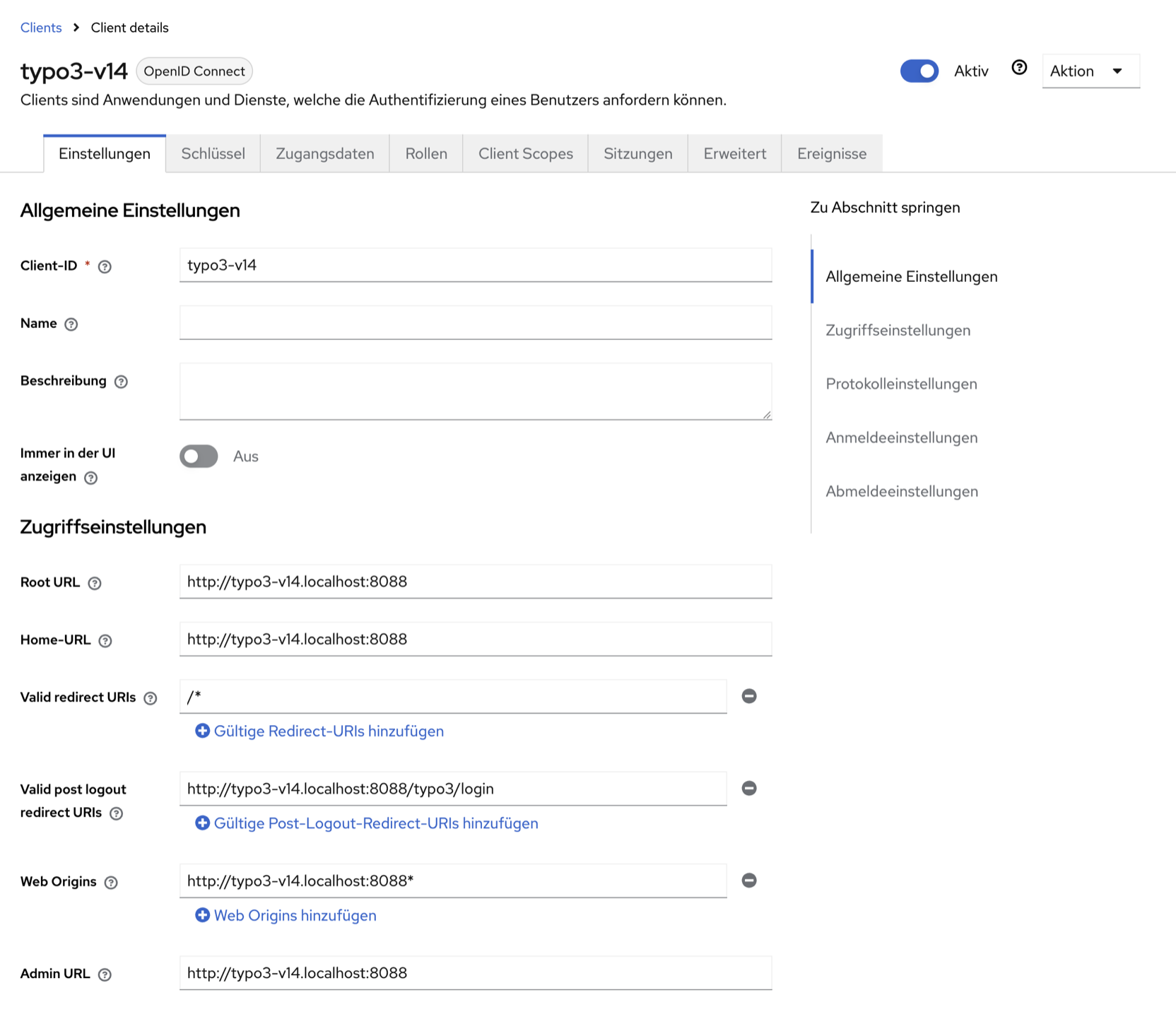
1. Access settings
Tab Settings, section Access settings:
| Field | Value | Note |
|---|---|---|
| Root URL, Home URL | http://typo3-v14.localhost:8088 | base for relative addresses |
| Valid redirect URIs | /* | relative to the root URL; after login TYPO3 returns to /typo3/… |
| Valid post logout redirect URIs | http://typo3-v14.localhost:8088/typo3/login | target after single logout |
| Web origins | any | not needed: the login runs server-side, not via JavaScript |
| Admin URL | any | not used by TYPO3 |
2. Protocol settings
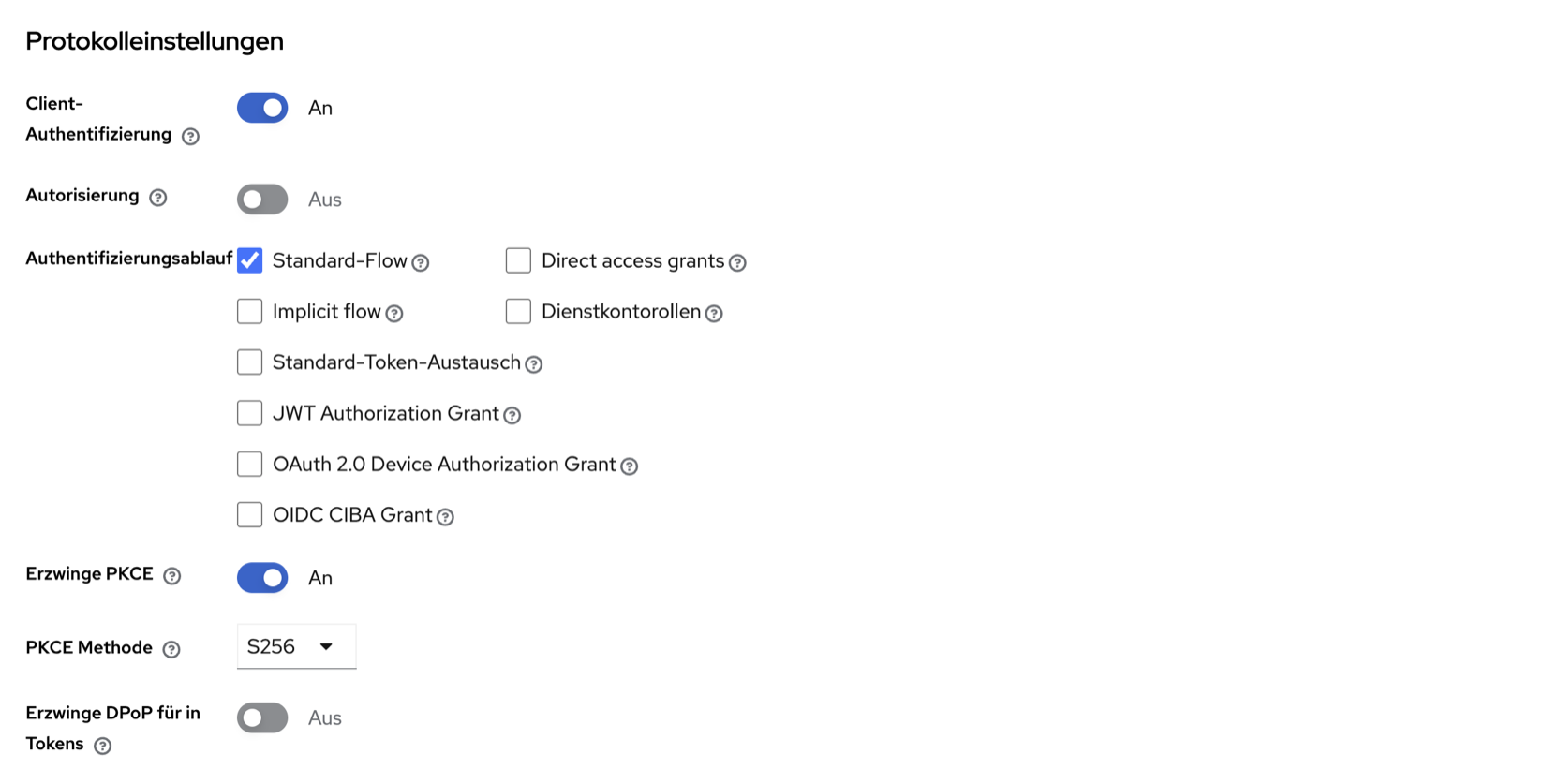
- Client authentication: on – confidential client with a client secret (step 4).
- Authorization: off
- Authentication flow: only standard flow (authorization code). Direct access grants, implicit flow and the other grants stay off.
- Require PKCE: on, PKCE method: S256 – causal/oidc sends the PKCE parameters (
enableCodeVerifierinadditional.php). - Require DPoP: off
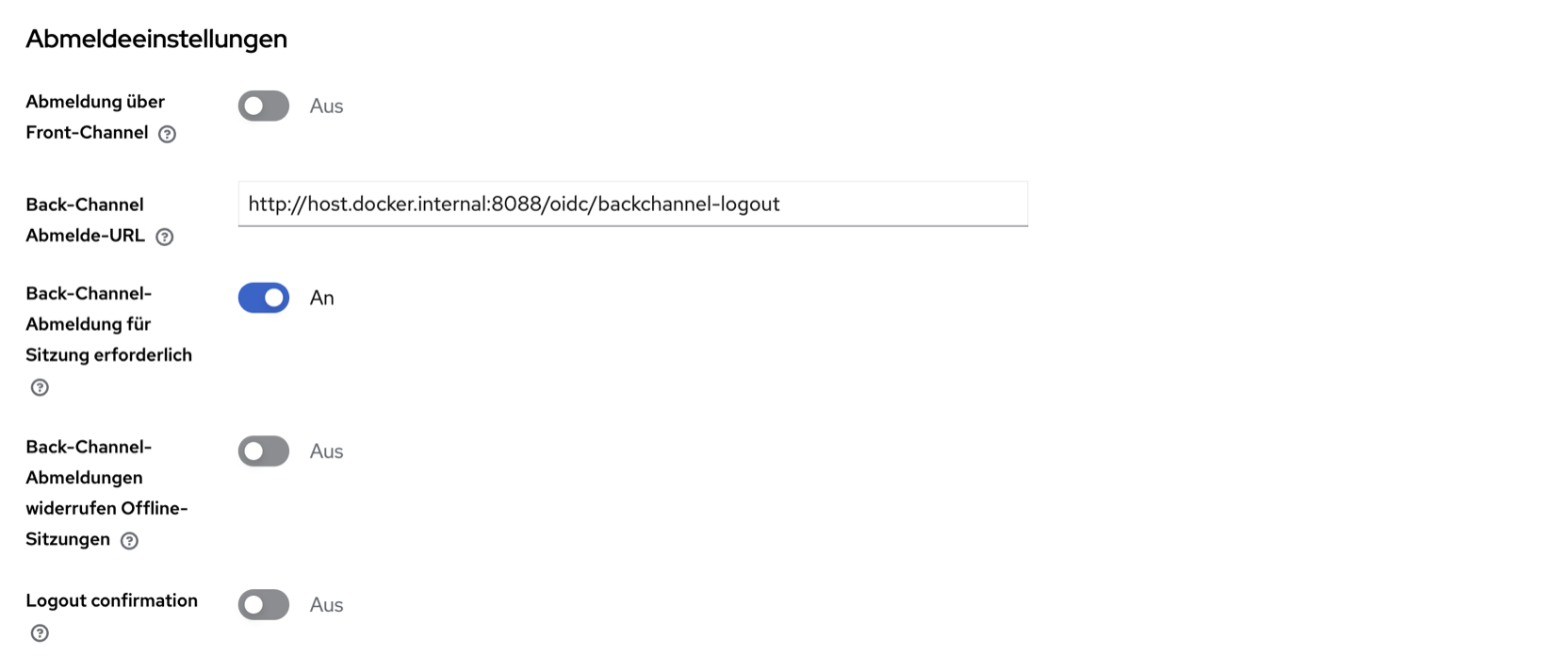
3. Logout settings
| Field | Value |
|---|---|
| Front channel logout | off |
| Backchannel logout URL | http://host.docker.internal:8088/oidc/backchannel-logout |
| Backchannel logout session required | on (mandatory) |
| Backchannel logout revoke offline sessions | off |
| Logout confirmation | off |
Keycloak runs locally on the Docker network lr7 and reaches TYPO3 via host.docker.internal:8088. On a server, enter the public TYPO3 address.
TYPO3 matches logout tokens only by the Keycloak session ID sid. Without “session required” the sid is missing and TYPO3 rejects the token with 400. With “Logout confirmation”, Keycloak shows a confirmation page after logging out instead of redirecting back to the TYPO3 login page.
Then click Save at the bottom.
4. Copying the client secret to .env
Tab Credentials: client authenticator “Client Id and Secret”, copy the client secret and enter it in the appliance's .env:
TYPO3_OIDC_ISSUER=https://id.dev.sonia.de/realms/sonia
TYPO3_OIDC_CLIENT_ID=typo3-v14
TYPO3_OIDC_CLIENT_SECRET=<client secret>
Then run docker compose up -d. The secret belongs in .env only, never in versioned files, tickets or screenshots.
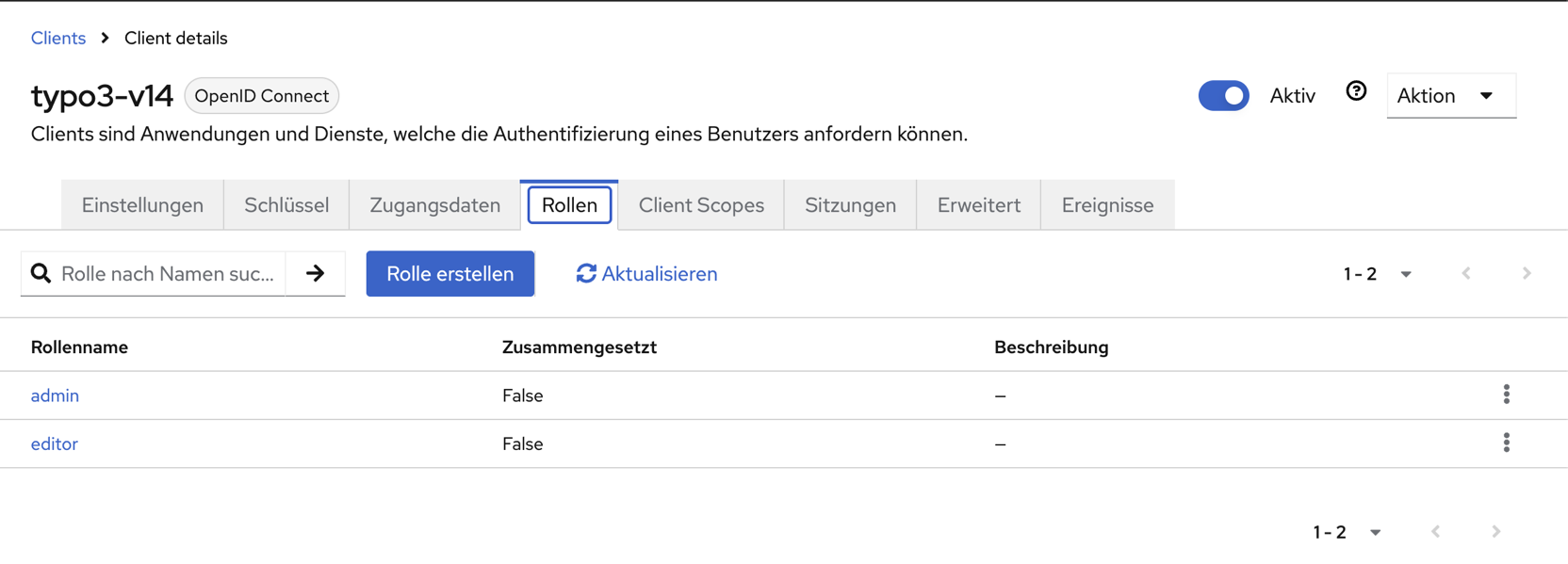
5. Creating and assigning client roles
Tab Roles → Create role: create the roles admin and editor (not composite).
Assign them under Users or Groups → tab Role mapping → Assign role, filter by client roles and choose typo3-v14 admin or typo3-v14 editor. Users without one of these roles are not created in TYPO3.
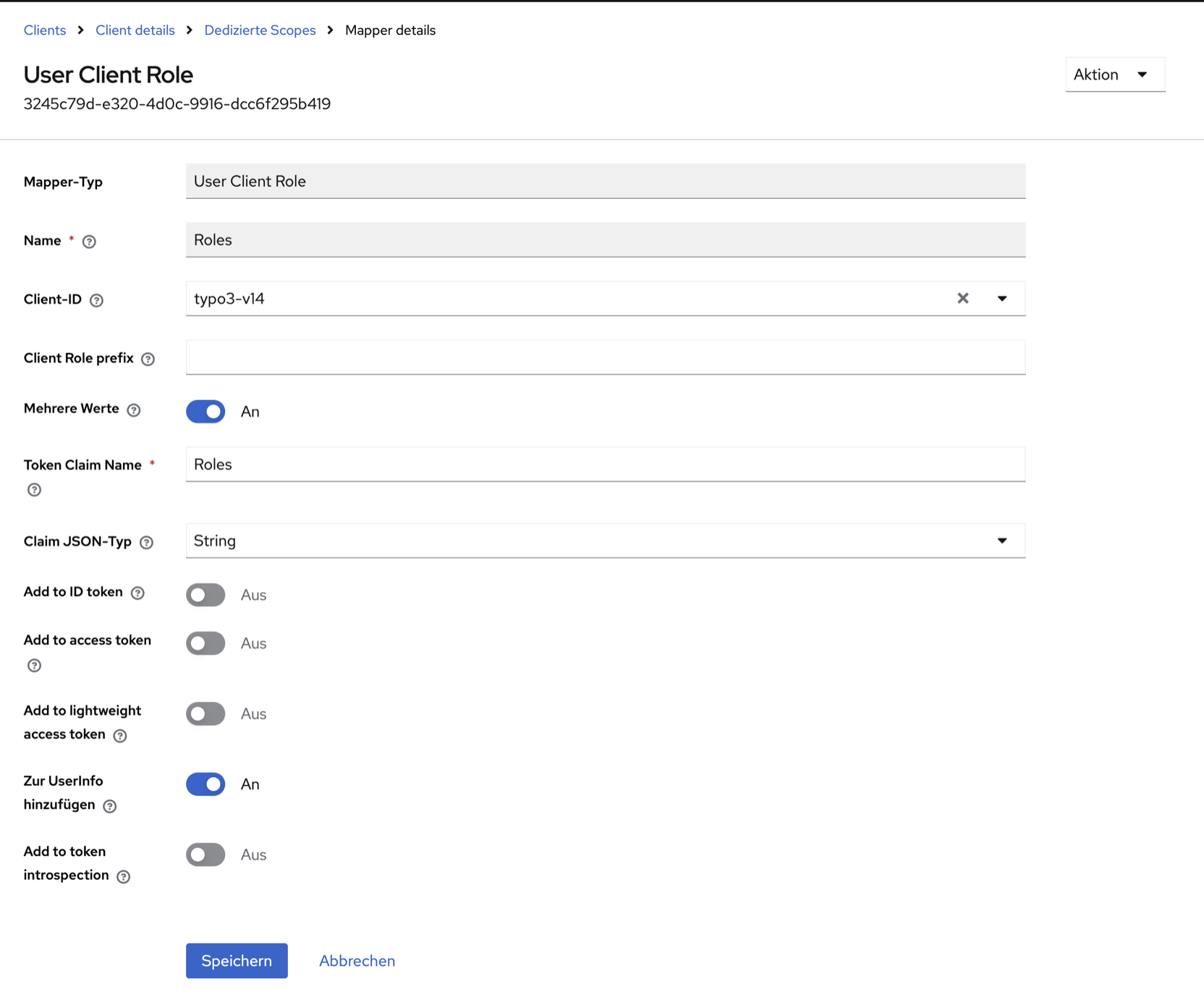
6. Mapper for the claim “Roles”
Tab Client scopes → typo3-v14-dedicated → Add mapper → By configuration → User Client Role:
| Field | Value |
|---|---|
| Name | Roles |
| Client ID | typo3-v14 |
| Client role prefix | empty |
| Multivalued | on |
| Token claim name | Roles (capital R) |
| Claim JSON type | String |
| Add to ID token, access token, lightweight access token, token introspection | off |
| Add to userinfo | on |
causal/oidc reads the roles only from the claim Roles in the userinfo response. They are not needed in the tokens.
7. Checking the client scopes
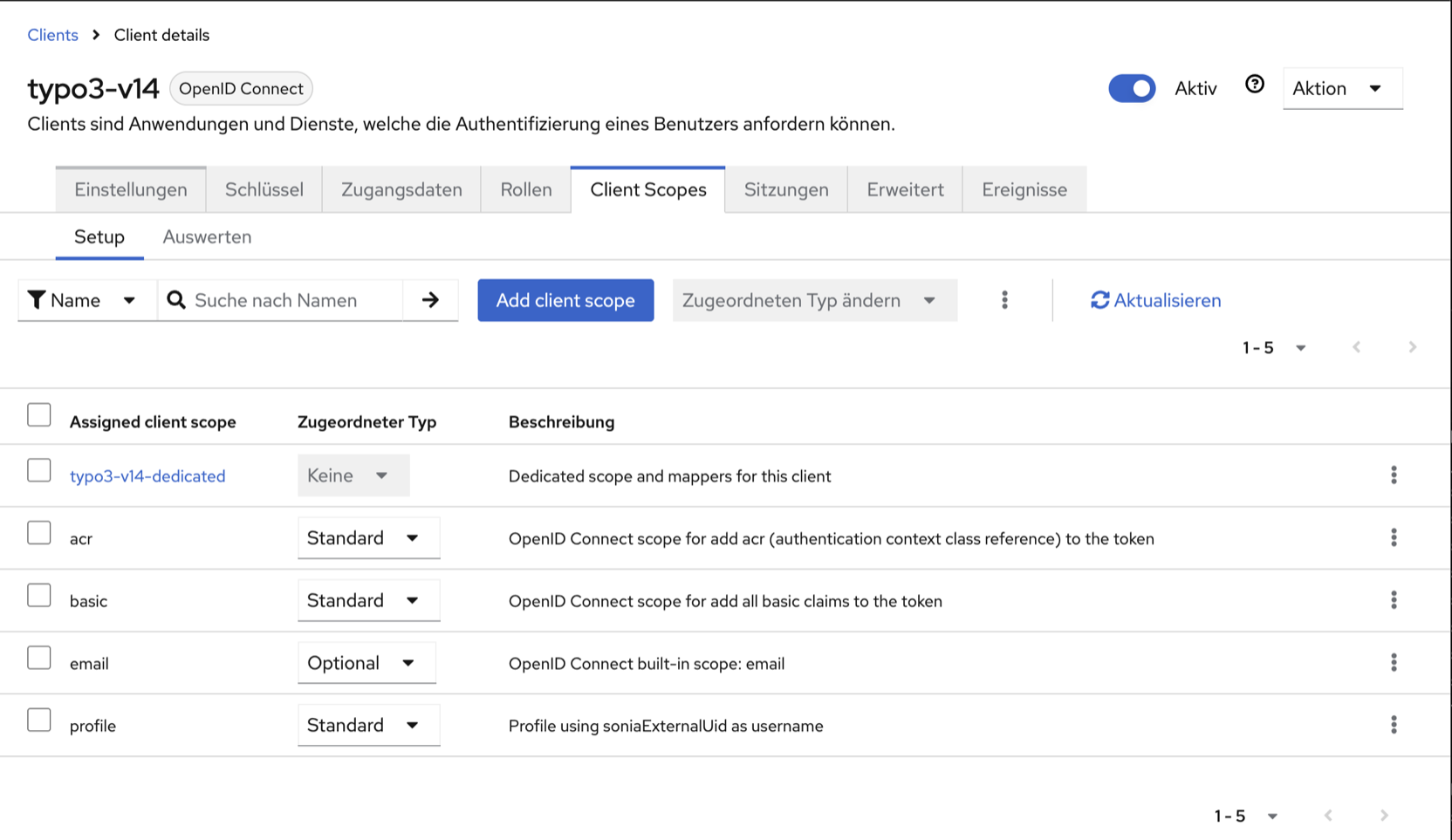
Assigned are typo3-v14-dedicated (with the mapper from step 6), acr, basic and profile as default and email as optional. TYPO3 requests openid profile email (TYPO3_OIDC_SCOPES) and therefore also receives the e-mail address.
In realm sonia, the scope profile sets the stable user name (soniaExternalUid, eid…) as preferred_username. TYPO3 uses it to match backend users; the internal Keycloak ID changes with every LDAP re-import.
You can check the result under Client scopes → Evaluate: choose a user, and the generated user info shows the claims preferred_username and Roles.
8. Testing
- Open
http://typo3-v14.localhost:8088/typo3/: the OIDC login is preselected and redirects to Keycloak. - After signing in you land in the backend. The user is named after
preferred_usernameand belongs to the group “Admin (Keycloak)” or “Editor (Keycloak)”. - Logging out of the backend also logs out of Keycloak (single logout). Conversely, “Sign out” in the Keycloak account console or deleting the session in the admin console ends the TYPO3 session (back channel).
oidc_backend logs the results to var/log/typo3_oidc_*.log. Error patterns and debug logging are described on the page “Sign-in via Keycloak”.